
API
Sky AI External API Documentation
TL;DR: https://dev-api.app.usesky.ai/external-api/docs (Swagger)
Overview
The Sky AI External API provides programmatic access to Sky AI's document processing and management platform. This API enables you to create cases, upload documents, manage document categories, and integrate Sky AI's powerful document processing capabilities into your own applications.
The API is built on REST principles with predictable resource-oriented URLs, accepts JSON-encoded request bodies, returns JSON-encoded responses, and uses standard HTTP response codes and authentication.
Base URL
Production: https://api.app.usesky.ai/external-api/
Development: https://dev-api.app.usesky.ai/external-api/
Authentication
The Sky AI External API uses API keys to authenticate requests. You can create and manage your API keys from the Sky AI dashboard under Settings > Developers > API Key.
Creating an API Key
- Log in to your Sky AI account
-
Navigate to Settings > Developers
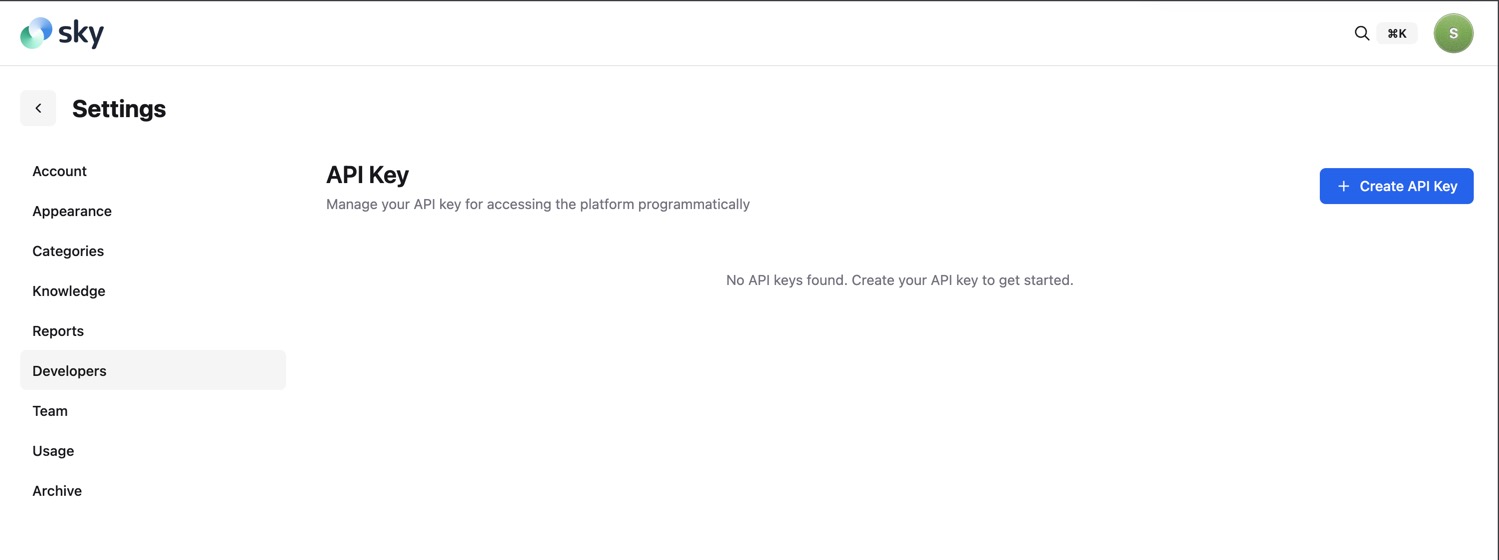
- Click Create API Key
- Enter a name for your API key (e.g., "Production Server")
-
Click Create
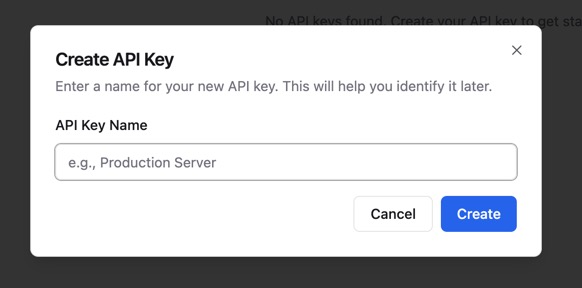
- Copy and securely store your API key - you won't be able to see it again
Using Your API Key
Include your API key in every request using one of two methods:
Method 1: Authorization Header (Recommended)
Authorization: Bearer YOUR_API_KEY
Method 2: X-API-Key Header
X-API-Key: YOUR_API_KEY
Security Best Practices
- Never share your API keys publicly or commit them to version control
- Store API keys securely using environment variables or a secrets manager
- Rotate API keys periodically
- Use different API keys for different environments (development, staging, production)
- Revoke API keys immediately if they are compromised
Rate Limiting
The API implements rate limiting to ensure fair usage and system stability:
- Rate Limit: 100 requests per minute per organization
- Rate limits are tracked using Redis and are organization-specific
- When you exceed the rate limit, you'll receive a
429 Too Many Requestsresponse
Rate limit information is included in response headers:
X-RateLimit-Limit: 100
X-RateLimit-Remaining: 95
X-RateLimit-Reset: 1699564800
Error Handling
The API uses conventional HTTP response codes to indicate the success or failure of requests:
- 2xx - Success
- 4xx - Client errors (invalid request, authentication failure, etc.)
- 5xx - Server errors
Error Response Format
{
  "statusCode": 400,
  "message": "Validation failed",
  "error": "Bad Request"
}
Common Error Codes
| Status Code | Description |
|---|---|
| 400 | Bad Request - Invalid request parameters |
| 401 | Unauthorized - Invalid or missing API key |
| 404 | Not Found - Resource doesn't exist |
| 429 | Too Many Requests - Rate limit exceeded |
| 500 | Internal Server Error - Something went wrong on our end |
API Resources
Cases
Cases (also called "Folders" or "Projects" internally) are containers for organizing documents. Each case represents a distinct matter, claim, or project that you're working on.
Create a Case
Creates a new case in your organization.
Endpoint: POST /cases
Request Body:
| Field | Type | Required | Description |
|---|---|---|---|
| name | string | Yes | Name of the case |
| claimNumber | string | Yes | Unique claim or case number |
| dateOfBirth | string | Yes | Date of birth (ISO 8601 format or string) |
| dateOfLoss | string | No | Date of loss/incident (ISO 8601 format or string) |
Example Request:
curl -X POST https://api.app.usesky.ai/external-api/cases \
  -H "Authorization: Bearer YOUR_API_KEY" \
  -H "Content-Type: application/json" \
  -d '{
    "name": "Smith vs. Johnson",
    "claimNumber": "CLM-2024-001",
    "dateOfBirth": "1985-03-15",
    "dateOfLoss": "2024-01-10"
  }'
Response: 201 Created
"case_abc123def456"
The response returns the unique case ID as a string.
JavaScript Example:
const response = await fetch('https://api.app.usesky.ai/external-api/cases', {
  method: 'POST',
  headers: {
    'Authorization': 'Bearer YOUR_API_KEY',
    'Content-Type': 'application/json'
  },
  body: JSON.stringify({
    name: 'Smith vs. Johnson',
    claimNumber: 'CLM-2024-001',
    dateOfBirth: '1985-03-15',
    dateOfLoss: '2024-01-10'
  })
});

const caseId = await response.json();
console.log('Created case:', caseId);
Python Example:
import requests

response = requests.post(
    'https://api.app.usesky.ai/external-api/cases',
    headers={
        'Authorization': 'Bearer YOUR_API_KEY',
        'Content-Type': 'application/json'
    },
    json={
        'name': 'Smith vs. Johnson',
        'claimNumber': 'CLM-2024-001',
        'dateOfBirth': '1985-03-15',
        'dateOfLoss': '2024-01-10'
    }
)

case_id = response.json()
print(f'Created case: {case_id}')
List Cases
Retrieves a paginated list of all cases in your organization.
Endpoint: GET /cases
Query Parameters:
| Parameter | Type | Default | Description |
|---|---|---|---|
| page | integer | 1 | Page number for pagination |
| limit | integer | 20 | Number of items per page (min: 10, max: 100) |
Example Request:
curl -X GET "https://api.app.usesky.ai/external-api/cases?page=1&limit=20" \
  -H "Authorization: Bearer YOUR_API_KEY"
Response: 200 OK
{
  "folders": [
    {
      "id": "case_abc123def456",
      "name": "Smith vs. Johnson",
      "dateOfLoss": "2024-01-10T00:00:00.000Z",
      "dateOfBirth": "1985-03-15T00:00:00.000Z",
      "contextIrrelevant": false,
      "lastPipelineUpdatedAt": "2024-11-12T10:30:00.000Z"
    }
  ],
  "pagination": {
    "page": 1,
    "limit": 20,
    "total": 45,
    "totalPages": 3
  }
}
JavaScript Example:
const response = await fetch(
  'https://api.app.usesky.ai/external-api/cases?page=1&limit=20',
  {
    headers: {
      'Authorization': 'Bearer YOUR_API_KEY'
    }
  }
);

const data = await response.json();
console.log(`Found ${data.pagination.total} cases`);
data.folders.forEach(case => {
  console.log(`- ${case.name} (${case.id})`);
});
Python Example:
import requests

response = requests.get(
    'https://api.app.usesky.ai/external-api/cases',
    headers={'Authorization': 'Bearer YOUR_API_KEY'},
    params={'page': 1, 'limit': 20}
)

data = response.json()
print(f"Found {data['pagination']['total']} cases")
for case in data['folders']:
    print(f"- {case['name']} ({case['id']})")
Get Case by ID
Retrieves detailed information about a specific case.
Endpoint: GET /cases/{id}
Path Parameters:
| Parameter | Type | Description |
|---|---|---|
| id | string | The unique case ID |
Example Request:
curl -X GET https://api.app.usesky.ai/external-api/cases/case_abc123def456 \
  -H "Authorization: Bearer YOUR_API_KEY"
Response: 200 OK
{
  "id": "case_abc123def456",
  "name": "Smith vs. Johnson",
  "type": "ROOT",
  "organizationId": "org_xyz789",
  "authorId": "user_123",
  "claimNumber": "CLM-2024-001",
  "dateOfBirth": "1985-03-15T00:00:00.000Z",
  "dateOfLoss": "2024-01-10T00:00:00.000Z",
  "createdAt": "2024-11-01T09:00:00.000Z",
  "updatedAt": "2024-11-12T10:30:00.000Z"
}
Archive a Case
Archives a case and all its associated documents. Archived cases are moved to a separate storage area and are no longer actively processed.
Endpoint: PATCH /cases/{id}/archive
Path Parameters:
| Parameter | Type | Description |
|---|---|---|
| id | string | The unique case ID |
Example Request:
curl -X PATCH https://api.app.usesky.ai/external-api/cases/case_abc123def456/archive \
  -H "Authorization: Bearer YOUR_API_KEY"
Response: 200 OK
No response body is returned on success.
JavaScript Example:
const response = await fetch(
  'https://api.app.usesky.ai/external-api/cases/case_abc123def456/archive',
  {
    method: 'PATCH',
    headers: {
      'Authorization': 'Bearer YOUR_API_KEY'
    }
  }
);

if (response.ok) {
  console.log('Case archived successfully');
}
Python Example:
import requests

response = requests.patch(
    'https://api.app.usesky.ai/external-api/cases/case_abc123def456/archive',
    headers={'Authorization': 'Bearer YOUR_API_KEY'}
)

if response.ok:
    print('Case archived successfully')
Document Categories
Document categories help organize and classify documents within your cases. Categories are organization-wide templates that define how documents should be classified, named, and processed.
List Categories
Retrieves all document categories for your organization.
Endpoint: GET /categories
Example Request:
curl -X GET https://api.app.usesky.ai/external-api/categories \
  -H "Authorization: Bearer YOUR_API_KEY"
Response: 200 OK
[
  {
    "id": 1,
    "name": "Medical Records",
    "color": "#3B82F6",
    "definition": "All medical documentation including doctor's notes, test results, and treatment records",
    "namingConvention": "MED-[Date]-[Type]",
    "namingExample": "MED-2024-01-15-Lab-Results",
    "length": "Varies, typically 5-50 pages",
    "keyTopics": "Diagnosis, treatment, medications, test results",
    "expectedContent": "Clinical notes, lab results, imaging reports, prescriptions",
    "recognitionTips": "Look for medical terminology, doctor signatures, hospital letterhead",
    "isFallback": false
  },
  {
    "id": 2,
    "name": "Legal Documents",
    "color": "#8B5CF6",
    "definition": "Legal correspondence, contracts, and court documents",
    "namingConvention": "LEGAL-[Date]-[Type]",
    "namingExample": "LEGAL-2024-02-01-Contract",
    "length": "Varies, typically 2-100 pages",
    "keyTopics": "Agreements, litigation, compliance",
    "expectedContent": "Contracts, pleadings, motions, correspondence",
    "recognitionTips": "Legal terminology, signatures, notarization",
    "isFallback": false
  }
]
JavaScript Example:
const response = await fetch(
  'https://api.app.usesky.ai/external-api/categories',
  {
    headers: {
      'Authorization': 'Bearer YOUR_API_KEY'
    }
  }
);

const categories = await response.json();
categories.forEach(category => {
  console.log(`${category.name} (${category.color})`);
});
Python Example:
import requests

response = requests.get(
    'https://api.app.usesky.ai/external-api/categories',
    headers={'Authorization': 'Bearer YOUR_API_KEY'}
)

categories = response.json()
for category in categories:
    print(f"{category['name']} ({category['color']})")
Create a Category
Creates a new document category template for your organization.
Endpoint: POST /categories
Request Body:
| Field | Type | Required | Description |
|---|---|---|---|
| name | string | Yes | Category name |
| color | string | Yes | Hex color code (e.g., "#3B82F6") |
| definition | string | Yes | Description of what documents belong in this category |
| namingConvention | string | Yes | Convention for naming documents in this category |
| namingExample | string | Yes | Example of the naming convention |
| length | string | Yes | Expected length/page count of documents |
| keyTopics | string | Yes | Main topics covered in this category |
| expectedContent | string | Yes | Types of content expected in documents |
| recognitionTips | string | Yes | Tips for identifying documents in this category |
| isFallback | boolean | Yes | Whether this is a fallback category for unclassified documents |
Example Request:
curl -X POST https://api.app.usesky.ai/external-api/categories \
  -H "Authorization: Bearer YOUR_API_KEY" \
  -H "Content-Type: application/json" \
  -d '{
    "name": "Financial Records",
    "color": "#10B981",
    "definition": "Financial statements, invoices, and payment records",
    "namingConvention": "FIN-[Date]-[Type]",
    "namingExample": "FIN-2024-03-01-Invoice",
    "length": "Typically 1-20 pages",
    "keyTopics": "Payments, expenses, revenue, taxes",
    "expectedContent": "Invoices, receipts, bank statements, tax documents",
    "recognitionTips": "Look for dollar amounts, account numbers, payment terms",
    "isFallback": false
  }'
Response: 201 Created
{
  "id": 3,
  "name": "Financial Records",
  "color": "#10B981",
  "definition": "Financial statements, invoices, and payment records",
  "namingConvention": "FIN-[Date]-[Type]",
  "namingExample": "FIN-2024-03-01-Invoice",
  "length": "Typically 1-20 pages",
  "keyTopics": "Payments, expenses, revenue, taxes",
  "expectedContent": "Invoices, receipts, bank statements, tax documents",
  "recognitionTips": "Look for dollar amounts, account numbers, payment terms",
  "isFallback": false
}
JavaScript Example:
const response = await fetch(
  'https://api.app.usesky.ai/external-api/categories',
  {
    method: 'POST',
    headers: {
      'Authorization': 'Bearer YOUR_API_KEY',
      'Content-Type': 'application/json'
    },
    body: JSON.stringify({
      name: 'Financial Records',
      color: '#10B981',
      definition: 'Financial statements, invoices, and payment records',
      namingConvention: 'FIN-[Date]-[Type]',
      namingExample: 'FIN-2024-03-01-Invoice',
      length: 'Typically 1-20 pages',
      keyTopics: 'Payments, expenses, revenue, taxes',
      expectedContent: 'Invoices, receipts, bank statements, tax documents',
      recognitionTips: 'Look for dollar amounts, account numbers, payment terms',
      isFallback: false
    })
  }
);

const category = await response.json();
console.log('Created category:', category.id);
Python Example:
import requests

response = requests.post(
    'https://api.app.usesky.ai/external-api/categories',
    headers={
        'Authorization': 'Bearer YOUR_API_KEY',
        'Content-Type': 'application/json'
    },
    json={
        'name': 'Financial Records',
        'color': '#10B981',
        'definition': 'Financial statements, invoices, and payment records',
        'namingConvention': 'FIN-[Date]-[Type]',
        'namingExample': 'FIN-2024-03-01-Invoice',
        'length': 'Typically 1-20 pages',
        'keyTopics': 'Payments, expenses, revenue, taxes',
        'expectedContent': 'Invoices, receipts, bank statements, tax documents',
        'recognitionTips': 'Look for dollar amounts, account numbers, payment terms',
        'isFallback': False
    }
)

category = response.json()
print(f"Created category: {category['id']}")
Update a Category
Updates an existing document category.
Endpoint: PUT /categories/{id}
Path Parameters:
| Parameter | Type | Description |
|---|---|---|
| id | number | The category ID |
Request Body:
All fields from the create request are supported. All fields are optional - only include the fields you want to update.
Example Request:
curl -X PUT https://api.app.usesky.ai/external-api/categories/3 \
  -H "Authorization: Bearer YOUR_API_KEY" \
  -H "Content-Type: application/json" \
  -d '{
    "name": "Financial & Accounting Records",
    "color": "#059669"
  }'
Response: 200 OK
{
  "id": 3,
  "name": "Financial & Accounting Records",
  "color": "#059669",
  "definition": "Financial statements, invoices, and payment records",
  "namingConvention": "FIN-[Date]-[Type]",
  "namingExample": "FIN-2024-03-01-Invoice",
  "length": "Typically 1-20 pages",
  "keyTopics": "Payments, expenses, revenue, taxes",
  "expectedContent": "Invoices, receipts, bank statements, tax documents",
  "recognitionTips": "Look for dollar amounts, account numbers, payment terms",
  "isFallback": false
}
Delete a Category
Deletes a document category from your organization.
Endpoint: DELETE /categories/{id}
Path Parameters:
| Parameter | Type | Description |
|---|---|---|
| id | number | The category ID |
Example Request:
curl -X DELETE https://api.app.usesky.ai/external-api/categories/3 \
  -H "Authorization: Bearer YOUR_API_KEY"
Response: 200 OK
Returns the updated list of all remaining categories (same format as List Categories).
Document Upload
Upload documents to a specific case for processing. The API accepts PDF files and will automatically process them through Sky AI's document processing pipeline.
Upload a Document
Uploads a document file to a specific case.
Endpoint: POST /upload/{caseId}
Path Parameters:
| Parameter | Type | Description |
|---|---|---|
| caseId | string | The case ID to upload the document to |
Request Body:
This endpoint accepts multipart/form-data with a file field.
| Field | Type | Required | Description |
|---|---|---|---|
| file | file | Yes | The document file to upload (PDF format) |
Example Request:
curl -X POST https://api.app.usesky.ai/external-api/upload/case_abc123def456 \
  -H "Authorization: Bearer YOUR_API_KEY" \
  -F "file=@/path/to/document.pdf"
Response: 201 Created
{
  "uploadId": "upload_xyz789abc123"
}
The response returns a unique upload ID that can be used to track the upload and processing status.
JavaScript Example (Browser):
const fileInput = document.querySelector('input[type="file"]');
const file = fileInput.files[0];

const formData = new FormData();
formData.append('file', file);

const response = await fetch(
  'https://api.app.usesky.ai/external-api/upload/case_abc123def456',
  {
    method: 'POST',
    headers: {
      'Authorization': 'Bearer YOUR_API_KEY'
    },
    body: formData
  }
);

const result = await response.json();
console.log('Upload ID:', result.uploadId);
JavaScript Example (Node.js):
const fs = require('fs');
const FormData = require('form-data');
const fetch = require('node-fetch');

const form = new FormData();
form.append('file', fs.createReadStream('/path/to/document.pdf'));

const response = await fetch(
  'https://api.app.usesky.ai/external-api/upload/case_abc123def456',
  {
    method: 'POST',
    headers: {
      'Authorization': 'Bearer YOUR_API_KEY',
      ...form.getHeaders()
    },
    body: form
  }
);

const result = await response.json();
console.log('Upload ID:', result.uploadId);
Python Example:
import requests

with open('/path/to/document.pdf', 'rb') as file:
    response = requests.post(
        'https://api.app.usesky.ai/external-api/upload/case_abc123def456',
        headers={'Authorization': 'Bearer YOUR_API_KEY'},
        files={'file': file}
    )

result = response.json()
print(f"Upload ID: {result['uploadId']}")
Document Processing Pipeline
After uploading a document, Sky AI automatically processes it through a multi-stage pipeline:
- Preview Generation - Extracts document metadata
- Preprocessing - Splits document into pages and generates previews
- Content Extraction - Uses AI to extract text content from each page
- Continuation Analysis - Determines which pages belong together
- Summarization - Generates summaries for document sections
- Classification - Assigns documents to categories
- Context Generation - Creates chat-ready context for AI interactions
This processing happens asynchronously in the background. The time required depends on document size and complexity, typically ranging from a few seconds to several minutes for large documents.
Pagination
List endpoints support pagination using page and limit query parameters.
Parameters:
page(integer, default: 1) - The page number to retrievelimit(integer, default: 20, min: 10, max: 100) - Number of items per page
Response Format:
{
  "folders": [...],
  "pagination": {
    "page": 1,
    "limit": 20,
    "total": 45,
    "totalPages": 3
  }
}
Pagination Metadata:
page- Current page numberlimit- Items per pagetotal- Total number of itemstotalPages- Total number of pages
Best Practices
Error Handling
Always implement proper error handling in your integration:
try {
  const response = await fetch('https://api.app.usesky.ai/external-api/cases', {
    method: 'POST',
    headers: {
      'Authorization': 'Bearer YOUR_API_KEY',
      'Content-Type': 'application/json'
    },
    body: JSON.stringify(caseData)
  });

  if (!response.ok) {
    const error = await response.json();
    throw new Error(`API Error: ${error.message}`);
  }

  const result = await response.json();
  return result;
} catch (error) {
  console.error('Failed to create case:', error);
  // Handle error appropriately
}
Retry Logic
Implement exponential backoff for retrying failed requests:
async function apiRequestWithRetry(url, options, maxRetries = 3) {
  for (let i = 0; i < maxRetries; i++) {
    try {
      const response = await fetch(url, options);

      if (response.status === 429) {
        // Rate limited - wait and retry
        const waitTime = Math.pow(2, i) * 1000;
        await new Promise(resolve => setTimeout(resolve, waitTime));
        continue;
      }

      return response;
    } catch (error) {
      if (i === maxRetries - 1) throw error;
      await new Promise(resolve => setTimeout(resolve, Math.pow(2, i) * 1000));
    }
  }
}
Webhook Integration (Coming Soon)
Webhook support for real-time notifications about document processing status is planned for a future release. This will allow you to receive notifications when:
- Documents complete processing
- Cases are updated
- Processing errors occur
SDK Libraries
Official SDK libraries are planned for the following languages:
- JavaScript/TypeScript (Node.js and Browser)
- Python
- C# / .NET
- Java
Check the Sky AI Developer Portal for updates on SDK availability.
Support
If you encounter issues or have questions about the API:
- Documentation: https://app.usesky.ai/docs
- Support Email: support@usesky.ai
- Status Page: https://status.usesky.ai
Changelog
Version 1.0 (Current)
- Initial release of External API
- Case management endpoints
- Document category management
- Document upload functionality
- API key authentication
- Rate limiting (100 requests/minute)
Appendix
Supported File Formats
Currently, the API supports:
- PDF (.pdf)
Support for additional formats (DOCX, images, etc.) is planned for future releases.
API Limits
- Rate Limit: 100 requests per minute per organization
- File Size: Maximum 100MB per upload
- Page Count: Maximum 500 pages per document
Date Formats
The API accepts dates in the following formats:
- ISO 8601:
2024-01-15T10:30:00Z - Date string:
2024-01-15 - Human-readable:
January 15, 2024
Dates are returned in ISO 8601 format in API responses.
Color Codes
Category colors should be specified as hex color codes:
- Format:
#RRGGBB - Example:
#3B82F6(blue) - Must include the
#prefix - Case insensitive
HTTP Headers
Request Headers:
Authorization: Bearer YOUR_API_KEY- Authentication (required)Content-Type: application/json- For JSON request bodiesContent-Type: multipart/form-data- For file uploads
Response Headers:
Content-Type: application/json- All responses are JSONX-RateLimit-Limit- Rate limit maximumX-RateLimit-Remaining- Remaining requests in current windowX-RateLimit-Reset- Unix timestamp when rate limit resets